Actuators
Actuators are parts fitted into slots, exactly like the sensors. The concepts live in Slots and assembly, the vehicle’s slots and their accepted types in the configuration page, and new parts can be added following the Add a part guide.
Available actuators
Actuator |
Part |
Slot |
Fitted by default |
|---|---|---|---|
T200 thrusters, vectored horizontals |
|
|
yes |
T200 thrusters, verticals |
|
|
yes |
T200 thrusters, verticals (heavy variant only) |
|
|
heavy only |
Newton gripper |
|
|
no |
Sediment sampler |
|
|
no |
Actuators ROS API
Thrusters
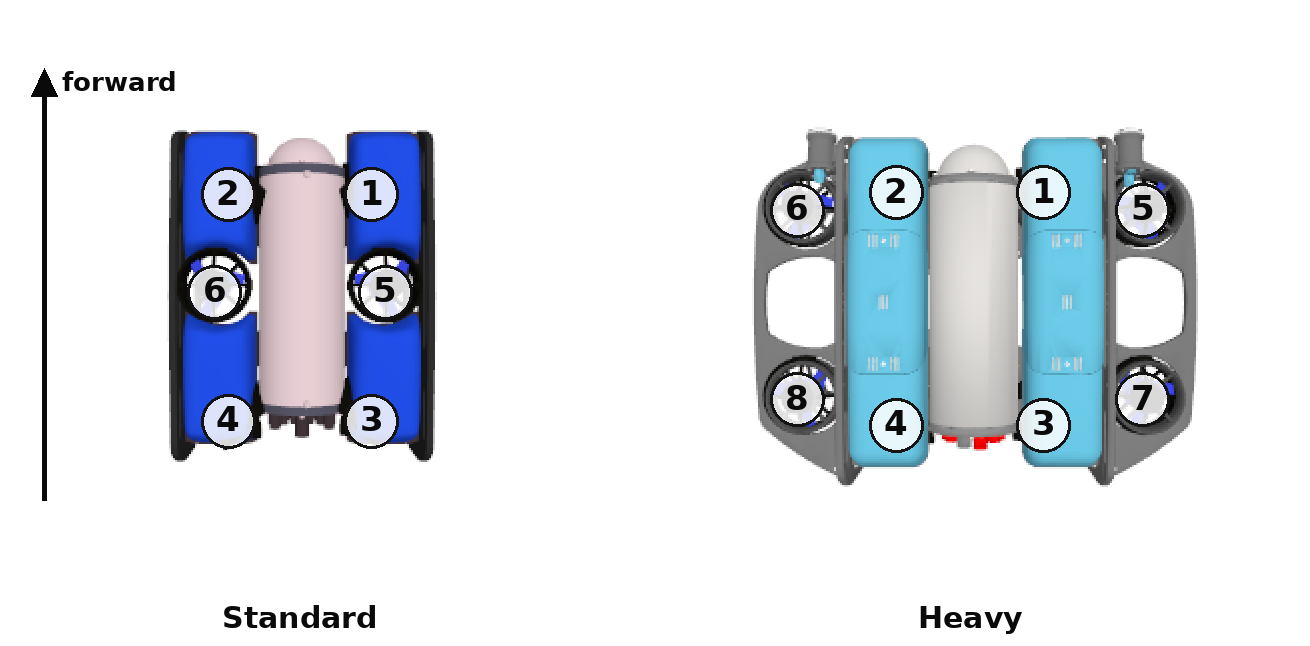
Thruster numbering, top view.
Each thruster plugin subscribes to a gz transport topic. Each of those gz
topics is bridged to ROS and indexed by number, starting at 1, under the
instance name, <name>: bluerov2 for the default instance, which the
commands below use, or whatever the vehicle was spawned as
(Several vehicles).
ROS Topic |
Description |
Message type |
|---|---|---|
|
Normalized thrust command in [-1, 1]: +1 full ahead, -1 full astern, 0 stop |
The command is a fraction of the propeller’s own limits, which the model takes from the part’s drive table - 51.5 N ahead and -40.2 N astern for a T200 at 16 V. The two directions scale independently, so +0.5 and -0.5 are equal command and unequal force. Values outside [-1, 1] are clamped.
To manually send a thruster command via ROS:
ros2 topic pub /bluerov2/thruster_1/cmd std_msgs/msg/Float64 "data: -0.2" -1
The layout follows ArduSub’s Vectored frame (Vectored-6DOF on the heavy variant); the numbering in simulation is the figure above. The horizontal thrusters (1-4) are vectored at 45 degrees, so single-axis motion needs a mix with these signs:
motion |
t1 |
t2 |
t3 |
t4 |
t5 |
t6 |
t7 |
t8 |
|---|---|---|---|---|---|---|---|---|
surge +x (forward) |
- |
- |
+ |
+ |
0 |
0 |
0 |
0 |
sway +y (left) |
- |
+ |
- |
+ |
0 |
0 |
0 |
0 |
yaw +z (counterclockwise) |
- |
+ |
+ |
- |
0 |
0 |
0 |
0 |
heave +z (up) |
0 |
0 |
0 |
0 |
- |
- |
- |
- |
On the heavy variant all four corner verticals share heave; differential use of its verticals also gives it roll and pitch authority the standard vehicle does not have.
Command all thrusters together
Bringing thrusters up one command at a time leaves the wrench unbalanced
while the remaining commands arrive, yawing the vehicle off its heading
before it translates. Controllers that publish continuously (teleop,
ArduPilot, MAVROS) are unaffected. Stop by publishing data: 0.0 to all
thrusters.
Grippers
ROS Topic |
Description |
Message type |
|---|---|---|
|
Jaw angle command, 0 rad closed to 0.6 rad open |
To drive with a gamepad instead, a ready mixer for either vehicle is in Teleoperate with a gamepad.
Gazebo transport API
The same topics exist on the Gazebo side (the bridge exposes them to ROS under the same names), plus a speed feedback per thruster:
gz Topic |
Description |
Message type |
|---|---|---|
|
Normalized thrust command in [-1, 1] |
|
|
Propeller speed feedback (rad/s) |
|
|
Jaw angle command |
|
Command the mix together (& + wait publishes in parallel):
# surge forward at 20 percent command on the four horizontals
gz topic -t /bluerov2/thruster_1/cmd -m gz.msgs.Double -p 'data: -0.2' &
gz topic -t /bluerov2/thruster_2/cmd -m gz.msgs.Double -p 'data: -0.2' &
gz topic -t /bluerov2/thruster_3/cmd -m gz.msgs.Double -p 'data: 0.2' &
gz topic -t /bluerov2/thruster_4/cmd -m gz.msgs.Double -p 'data: 0.2' &
wait